Roux · Business analytics
Business analytics, from data preparation to presentation
Roux brings data modeling, analysis, visualization and presentation together in one place. It is offered as a desktop application and as a hosted service for team collaboration.
Revenue by month
Margin rate by category
Overview
One platform for analysis and reporting
Roux unifies data preparation, a governed semantic model, interactive dashboards and report production, with forecasting and anomaly detection built in. Analysts model the data and define each measure once, and every dashboard, presentation and export built on it uses the same definition.
Totals stay precise: sums and averages are computed in exact decimal arithmetic rather than binary floating point, so no rounding error accumulates and row order never changes a total.

Semantic model
Define a measure once and reuse it across dashboards
Measures are written in a DAX-style formula language with CALCULATE, iterators such as SUMX, variables and 18 time-intelligence functions, including year-to-date and same-period-last-year. Charts and KPI tiles reference each measure by name, so a change to a measure applies to every chart and tile that uses it.
Shared metrics carry a lifecycle status, from draft to deprecated, and a version history, and apply to any dataset by mapping their inputs to its columns. A measure can also carry a target. The catalog's lineage view shows which charts and dashboards use each measure, and which charts are built on each dataset.
- Margin %Retail Sales
DIVIDE(SUM([Margin]), SUM([Revenue])) - Defect RateManufacturing Production
DIVIDE(SUM([Defects]), SUM([UnitsProduced])) - Portfolio MRRSaaS Latest Account Snapshot
SUM([MRR]) - Fault RateIoT Sensor Readings
DIVIDE(CALCULATE(COUNTROWS(), [Status]="FAULT"), COUNTROWS())
Workflow
Prepare, model and deliver reports end to end
Connect data sources
Bring in Excel, CSV, TSV, JSON, Parquet and SQLite files, down to individual workbook sheets or database tables. Nested JSON is split into related tables. Numbers written with currency symbols, thousands separators or lakh and crore grouping are read as numbers. The desktop application also connects to PostgreSQL, MySQL, Snowflake, BigQuery, SharePoint and web APIs.
Prepare data, with join and quality checks built in
Preparation offers 39 step types, from filtering, grouping and pivoting to joins, unions, running totals, rankings and exact or fuzzy lookups.
- Join steps show the predicted row count and warn about duplicated or unmatched keys before the model is saved
- Data contracts check completeness, uniqueness, ranges, allowed values and patterns
Model relationships and measures
Relate datasets many-to-one or one-to-one without copying data. When a chart combines measures from related datasets, each measure is aggregated at its own level of detail, so totals are not double-counted.
- User-defined functions and reusable calculations that apply to any dataset by mapping their inputs to its columns
- Each relationship reports its cardinality, and one that would multiply rows is flagged
Build interactive dashboards and drill through to the detail
Dashboards combine 25 chart types, including maps, Sankey, waterfall and box plots, with tables, matrices, KPI tiles and slicers on a free-form canvas. Phone and tablet layouts are generated from the same design and can be fine-tuned per device.
- Slicers can highlight matching bars and columns instead of filtering them out
- Automatic insights summarize trends, outliers and concentration, alongside a gallery of suggested charts
- Forecasts with confidence bands and anomaly detection on line and area charts, and clustering on scatter charts
Present, export and share dashboards
Present a dashboard full-window, or export it to PowerPoint or PDF. In an editable PowerPoint file, tables become native tables; common chart types, such as bar, line, pie and scatter, export as native, editable charts, the rest as exact pictures. From Chart Studio, individual charts of common types also export to Excel as native charts.
- Bar, column, line, area, pie, donut and radar charts in an existing PowerPoint file import as editable Roux charts, with their data as a new dataset
- Every PowerPoint export reports how many charts are editable and how many are pictures, and why
- On the hosted service, dashboards, reports or single pages publish to the whole organization or to specific people, through links that expire after 1, 7 or 30 days
Export
PowerPoint and PDF files that keep the dashboard's layout
Each dashboard page becomes one slide or one PDF page, with its objects placed as they are on screen.
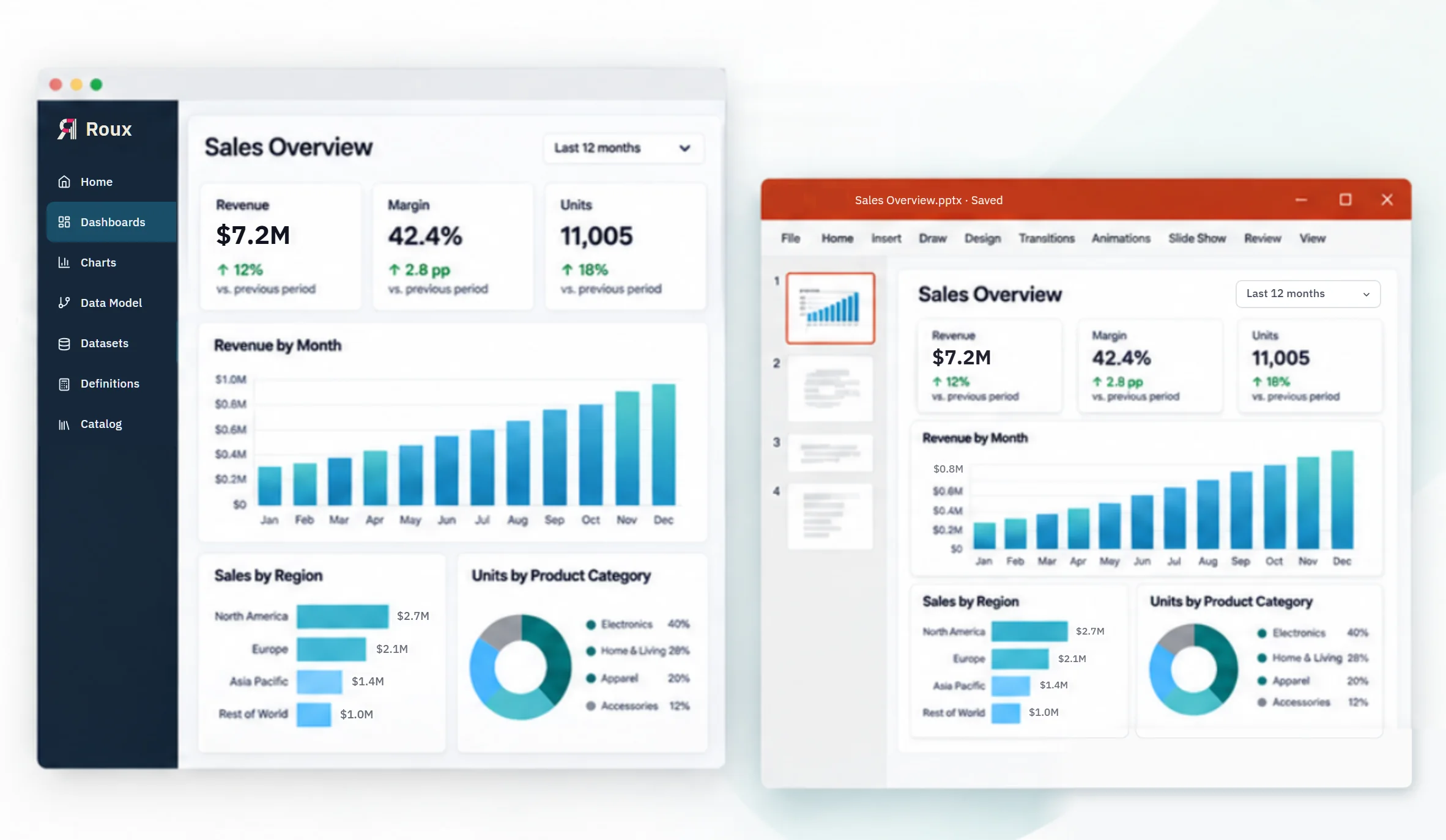
- Two PowerPoint formats: Editable, with native text, tables, shapes and common chart types, or Exact match, the same slides with every chart as an exact picture
- Filter controls are exported as shown or omitted. The filters apply in both cases, and a selection the page does not show is stated on the page, or in the slide's notes, for example "Line: L1, L3"
- Slides keep the dashboard's size or scale to PowerPoint's 13.33-inch widescreen width; PDF pages keep each page's own size
Sample workspace
Try the demo
The sign-in page lists two demo accounts with their passwords. Each opens the same workspace of synthetic retail, manufacturing, SaaS and IoT data.
Demo accounts cannot upload data, publish or save: changes stay in the browser and are discarded when the session ends. A demo session ends after 10 minutes, or after 5 minutes without activity. The data in any export from a demo account is synthetic sample data.
Security on the hosted service
Server-enforced access and an append-only audit log
Every data request, including API calls, is authorized on the server against the user's workspace role and the dataset's access rules.
Two-step verification for every team account
Every team account signs in with a password and a code from an authenticator app. If a device is lost, access is restored with a recovery code or through an audited reset by an administrator; administrators cannot reset their own.
Invitation-only accounts and workspace roles
Accounts are created by administrator invitation only. Each user holds one role per workspace: owner, editor or viewer.
Row and column security
Dataset rules limit the rows and columns each user sees, in dashboards and through the API. Owners of a dataset's workspace see all of its data.
Hash-chained, append-only audit logs
Access decisions and data changes are recorded in append-only, hash-chained logs before each response is sent, so verification detects any entry altered, removed or reordered within the chain. Sign-ins are also recorded. Requests without a valid session are recorded individually up to a limit and, beyond it, summarized per minute by source.
Sensitivity and endorsement labels
A dataset can carry a sensitivity label (Public, Internal, Confidential or Restricted) and an endorsement, such as Promoted or Deprecated. After a dataset is created, only a workspace owner can change its labels.
Publishing controlled by role and permission
Workspace owners and editors can publish dashboards within the organization. Publishing outside it requires an administrator to grant that user permission.
For developers
Workspace data over HTTP, under the same access rules
The hosted service offers a documented HTTP API to read workspace contents and query datasets, and to import CSV, TSV, Parquet, Excel (.xlsx) and SQLite files. Requests run in the signed-in session under the same role, row and column rules as the application.
Read the API documentationGET /api/v1/state?ws=<workspace>
GET /api/v1/rows/<dataset-id>?ws=<workspace>
POST /api/v1/upload
POST /call { "op": "…", "args": { … } }
Desktop application or hosted service for team collaboration
The desktop application runs on your own computer and works with files, databases and data warehouses. With your organization's Azure OpenAI or another OpenAI-compatible endpoint, it can build a chart from a plain-English request, describe key findings and draft an executive summary.
The hosted service adds shared workspaces, roles, row and column security, two-step verification and audit logs. Data is added by file import, in the application or through the API.
Contact us about licensing, a guided demonstration, a technical evaluation, feedback or any other question.